0.28.0 - reading the screen as text, and watching it while you are away
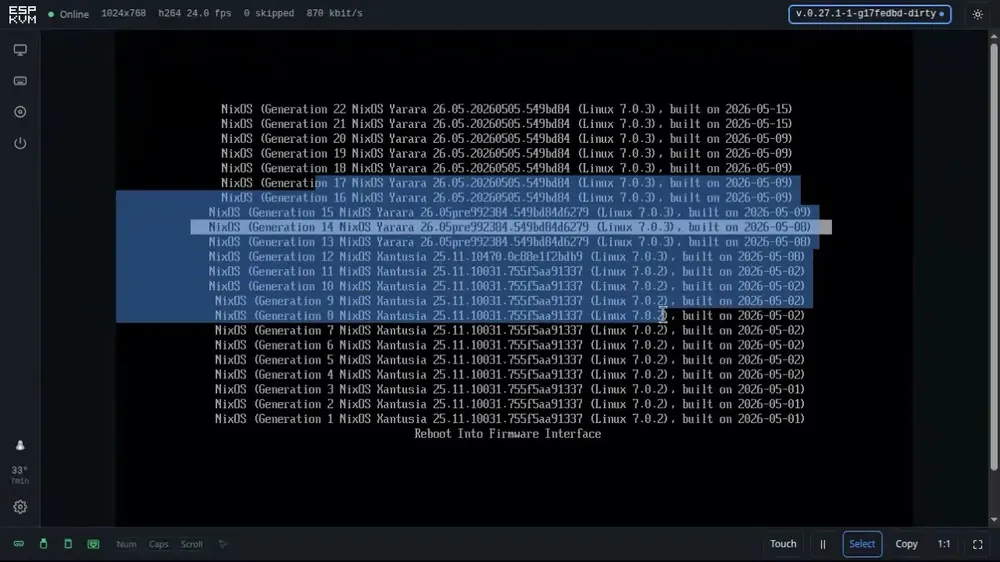
Getting a serial number or an error code off a BIOS screen used to mean reading it off the picture and typing it out somewhere else. Press Select and sweep the mouse over the picture as if it were a page, or press Copy and take the whole screen. A UEFI boot menu, memtest, a Linux console all come back as text.
There is a short silent clip: a NixOS boot menu, lines being selected with the mouse while the menu is walked up and down at the same time, so you can see it is the live screen and not a pasted screenshot.
Watch it on YouTube - no sound, nothing installed on the target, and the machine has not booted yet.
It is not OCR. A text screen is drawn by a character generator: a fixed grid, one fixed bitmap per character. Each cell is looked up in a table of the shapes the font has. Either it matches and the character is certain, or it comes back as a question mark and you can see which cells were not read. Nothing comes back as "probably".
Three fonts are known: the one a legacy BIOS draws with, the one a Linux console draws with (a different font - five printable characters differ, including f and v) and the one a UEFI console draws with.
The device can watch the screen when nobody is. Give it a phrase or two - no boot device, kernel panic - and with the console closed it reads the screen once a second and raises an alert the moment one appears, clearing it when it goes. Both edges go in the log, and Home Assistant gets a sensor with the matched text. It is off by default, and while it is off it costs nothing.
Also here: EDID profiles that cap the target at 720p or 1024x768, which on older silicon is the difference between 7 frames a second and something you can work in; the Pins tab now draws the board's expansion header the way it is printed instead of a list of GPIO numbers; and paste learned Czech, Ukrainian and Lithuanian.