ESP-KVM for writers
If you are writing about this project, take whatever is useful from this page. The descriptions are meant to be pasted, the numbers are ones I can defend, and the limits are here so you do not have to guess at them. Nothing on this page needs my permission first.
The project, at three lengths
Every box holds four wordings of the same thing and shows one at random, so that two people writing in the same week do not end up publishing the same sentence. Press Another wording to see the rest; all four are in the page whether or not you do.
One line
ESP-KVM is open-source firmware that turns a small ESP32-P4 board into an IP-KVM: it plugs into a computer's video output and one USB port, and serves that machine's screen, keyboard and mouse to a browser.
ESP-KVM is open-source firmware for the ESP32-P4 that gives an ordinary computer what servers have always had: its screen, keyboard and mouse in a browser, whether or not the machine is running.
ESP-KVM is an open-source IP-KVM on a small ESP32-P4 board - it takes a machine's HDMI output and one of its USB ports, and hands you that machine in a browser tab.
ESP-KVM is open-source firmware that makes an inexpensive ESP32-P4 board pretend to be a monitor and a keyboard for another computer, reachable from a browser anywhere on the network.
A paragraph
ESP-KVM is open-source firmware that turns a small ESP32-P4 board into an IP-KVM. It plugs into a computer's HDMI output and one of its USB ports, and serves that machine's screen, keyboard and mouse to any browser on the network. Nothing is installed on the computer, which cannot tell that the keyboard and monitor are not real - so it works while the machine is in its BIOS, stuck at a boot menu, or running nothing at all. It is the thing servers have had for twenty years, for machines that never came with it.
Remote desktop needs a working computer. ESP-KVM is for the times when there is not one. It is open-source firmware for a small ESP32-P4 board that sits on a machine's HDMI output and one USB port and puts that machine's screen in a browser, with a keyboard and mouse that the computer believes are plugged into it. Nothing is installed on the far end, and nothing needs to be running there - a BIOS, a boot menu or a blank disk are all the same to it.
An IP-KVM is the box that lets you use a computer that cannot be reached any other way: it captures the screen and pretends to be the keyboard, so the machine can be driven from a browser even when its operating system is gone. ESP-KVM is that box built as open-source firmware on an ESP32-P4, a chip that costs a few pounds - the capability data centres take for granted, at a price a home server can carry.
ESP-KVM is open-source firmware for the ESP32-P4. Two small boards, one cable to a computer's HDMI output and one to a USB port, and that machine's screen appears in a browser with a working keyboard and mouse. The computer needs nothing installed and cannot tell the difference, so the connection holds through a reboot, a BIOS screen, an operating system that will not start, and a disk with nothing on it at all.
Longer
ESP-KVM is open-source firmware that turns a small ESP32-P4 board into an IP-KVM. It plugs into a computer's HDMI output and one of its USB ports, and serves that machine's screen, keyboard and mouse to any browser on the network. Nothing is installed on the computer, which cannot tell that the keyboard and monitor are not real, so it keeps working while the machine is in its BIOS, stuck at a boot menu, reinstalling, or switched off.
Beyond the screen and keyboard it can boot the machine from a disk image held on its own microSD card, press the power and reset buttons through two wires to the motherboard header, and read the screen back as text so a BIOS error can be copied instead of retyped. It runs on eight ESP32-P4 boards, installs from a web page with nothing to compile, and is Apache-2.0 licensed.
Every server room has a way in that does not depend on the server: a card that shows the screen and types on the keyboard whatever state the machine is in. ESP-KVM is that, as open-source firmware on an ESP32-P4 board, for the computers that never came with one. It takes HDMI on one side and a USB port on the other, and gives you the machine in a browser - through a reboot, a BIOS menu, a failed update or an empty disk.
It will also hand the target a disk image from its memory card as if someone had walked over with a USB stick, press the power button through two wires to the motherboard, watch the screen for phrases like "no boot device" while nobody is connected, and reach you over WireGuard or Tailscale. Installing it is a web page and a click, and all of it is Apache-2.0.
ESP-KVM is open-source firmware for the ESP32-P4 that does the job of an IP-KVM: the screen, keyboard and mouse of one computer, in a browser on another. The hardware is two small boards and no soldering - one captures HDMI, the other runs everything and presents itself to the target as a USB keyboard. The machine on the far end has nothing installed and no idea, so the link survives everything software cannot: a black screen, a boot menu, a system that will not start.
It carries the parts that make a remote fix possible rather than merely visible - booting the target from an image on its card, the power button through the motherboard header, the screen readable as text so an error can be copied and searched, alerts when a phrase appears on a screen nobody is watching, and a VPN of its own so none of it has to face the internet.
A home server that will not boot is a machine you have to walk to. ESP-KVM removes the walk. It is open-source firmware on a small ESP32-P4 board that takes the computer's HDMI output and one USB port and serves its screen, keyboard and mouse to a browser - no agent on the machine, no operating system needed, nothing to configure on the far end.
From that browser you can boot it from a disk image on the device's card, press its power button through two wires, copy text straight off a BIOS screen, and have it tell Home Assistant when the screen says something it should not. It runs on eight boards, is installed from a web page, and is Apache-2.0 licensed - which is the difference between this and the hardware it imitates.
What people use it for
The situations readers recognise, in the order they come up. There is a longer version of each in When remote desktop cannot help, with a drawing for every one - those drawings are mine and free to reprint.
- A parent's computer in another city. The fix is usually small - press a key, choose a different boot entry, undo an update - and over the phone it takes an hour. Through a browser it takes two minutes, and they do not have to touch anything.
- A home server nobody sits at. A machine in a cupboard with no screen and no keyboard, which works for months and then one day does not answer. Without a screen there is no way to see why.
- A house that runs on one small computer. When the machine behind the lights, the heating and the front door stops, nothing is running on it for the usual remote tools to talk to.
- Installing a system from far away. The device offers a disk image from its card as if someone had walked over and plugged in a USB stick, so a machine with an empty disk can be given a fresh system.
- A machine that is switched off. Two wires to the power pins on the motherboard, and the button in the browser does what the button on the case does.
- Anything expensive to reach. A workshop, a summer house, a rented server in another country, an old machine running one program that must not be touched. Getting to it costs more than fixing it.
What is unusual about it
Plenty of projects put a screen in a browser. These are the parts I would write about if I were you.
- The screen can be read as text. When the machine is showing a BIOS, a boot menu or a console, you can select that text with the mouse and copy it. It is not OCR: a text screen is drawn from a fixed set of character shapes, so each cell is looked up in a table of those shapes, and is either certain or marked unreadable. There is no "recognised with errors" to mislead anyone later.
- It can watch that screen while nobody is connected. Give it phrases - "no boot device", "kernel panic" - and it raises an alert when one appears, in its own log and in Home Assistant.
- It boots the target from an image on its card, so a machine with an empty disk, in another building, can be given a fresh system without anyone going there.
- Installing it is a web page. Plug the board into a laptop, open the flasher, click. No toolchain, no compiler, no command line.
- Remote access is built in. WireGuard and Tailscale both run on the device, so reaching it from outside the house does not need a second box or a forwarded port.
- The smallest build is the size of a matchbox and takes power and network from one PoE cable.
Everything it does
The whole list, for checking a sentence against. Everything here is in the released firmware today; the README keeps the same table with the fine print.
Screen and control
- Video capture that follows the target's resolution changes
- H.264 or MJPEG streaming
- Keyboard, absolute and relative pointer, media keys
- Pasting text — US English, Russian, Czech, Ukrainian, Lithuanian layouts
- Key macros of your own
- Use from a phone — touch trackpad and an on-screen keyboard
- Several viewers at once, one in control, with takeover
- Waking a sleeping machine from the keyboard
Recording it
- Recording the screen to the device's own microSD card — the stream the viewers already get, so nothing is encoded twice
- Screenshots to the card, on either codec
- A dashcam — the last minutes kept, and saved as an MP4 with chapters when a stop screen shows, a watched phrase appears, the power goes off, or you ask
- Clips to Telegram, as a video that plays in the chat
- Keystrokes as subtitles beside the video — masked as dots unless you ask for the characters
- A timelapse — one frame every few seconds, played back at 25 fps
- Playback in the console, streamed from the card, with seeking
- Searching a recording for what was on the screen — character screens only
Beyond the screen
- Virtual media — boot the target from an image on the card, or a small one in the device's own flash
- Power and reset buttons through the motherboard header, and the power LED read back
- Wake-on-LAN
- HDMI-CEC — a TV remote for the source, its name and power state, standby and wake; TC358743 boards, and only for sources that speak CEC
- Reading a text screen as text, and copying it
- Noticing a screen that has gone one flat colour
- Watching the screen for phrases while nobody is connected
- Guessing the target's operating system from how it enumerates USB
Getting to it
- Ethernet, or WiFi on boards with a co-processor — join a network or be one
- A rescue hotspot with a captive portal
- WireGuard or native Tailscale, built in — no port forward, no gateway
- HTTPS with a certificate the device issues itself, or one you bring
- A login with optional two-factor sign-in — a code from an authenticator app, and a password reset with the board's button
- A viewing token for dashboards — opens the picture and the figures, nothing that touches the target
- IPv4 and IPv6, with nothing to fill in
Living with it
- Firmware updates over the network, into a spare slot, with rollback
- Settings to a file and back — no secrets in it
- An optional status display — an I2C OLED or a round colour LCD
- An optional battery-backed clock — a DS3231 module keeps the time with no network
- Home Assistant over MQTT — sensors, buttons, an update entity, a camera of the screen
- Diagnostics, capability reporting and a device log
- A crash dump kept in flash when the firmware panics
- Thermal protection
What it is not
It is not a replacement for remote desktop. When a computer is healthy, remote desktop is faster and sharper and can move files; an IP-KVM is for the times when there is nothing running to connect to. 1080p arrives at about 22 to 24 frames per second on current silicon, which is right for fixing a machine and wrong for using one all day. And it is a device with complete control of a computer, so it belongs on a home network behind a VPN, not on the public internet - the documentation says so in the same words.
The numbers
| First public release | 23 July 2026 |
| Latest release | 0.51.2, 18 September 2026 |
| Licence | Apache-2.0 |
| Boards supported | Fifteen, across twenty-three published images (some silicon revisions need their own) |
| Hardware | An ESP32-P4 board and an HDMI capture board; optionally a status display, an optocoupler for the power button, and a microSD card |
| Video | H.264 encoded on the chip, or MJPEG; about 27 fps at 1080p on revision 3.x silicon |
| Written in | C on ESP-IDF; the console is Vue 3 and TypeScript, built into a single file and served from the device's own flash |
| Maintained by | Evgenij Spitsyn, one person |
Try it without hardware
demo.espkvm.io is the real console, running in the browser against a recorded machine. It is the quickest way to see what a reader would see. The flasher and the tools also run entirely in the page.
Logo
The mark is the name: it spells ESP-KVM in two lines, so there is no separate wordmark to chase. It comes in enough colours to sit on whatever background your page has - a badge with its own square, or bare glyphs in one colour. Please do not restretch it, recolour it into something else, or set it on a busy photograph; it is a pixel grid and it stops reading immediately.




For one-colour printing there are pure versions with nothing behind them:
black SVG or
PNG, and
white SVG or
PNG. The two colours the
mark normally uses are #0e1116 and #e6edf3.


Pictures
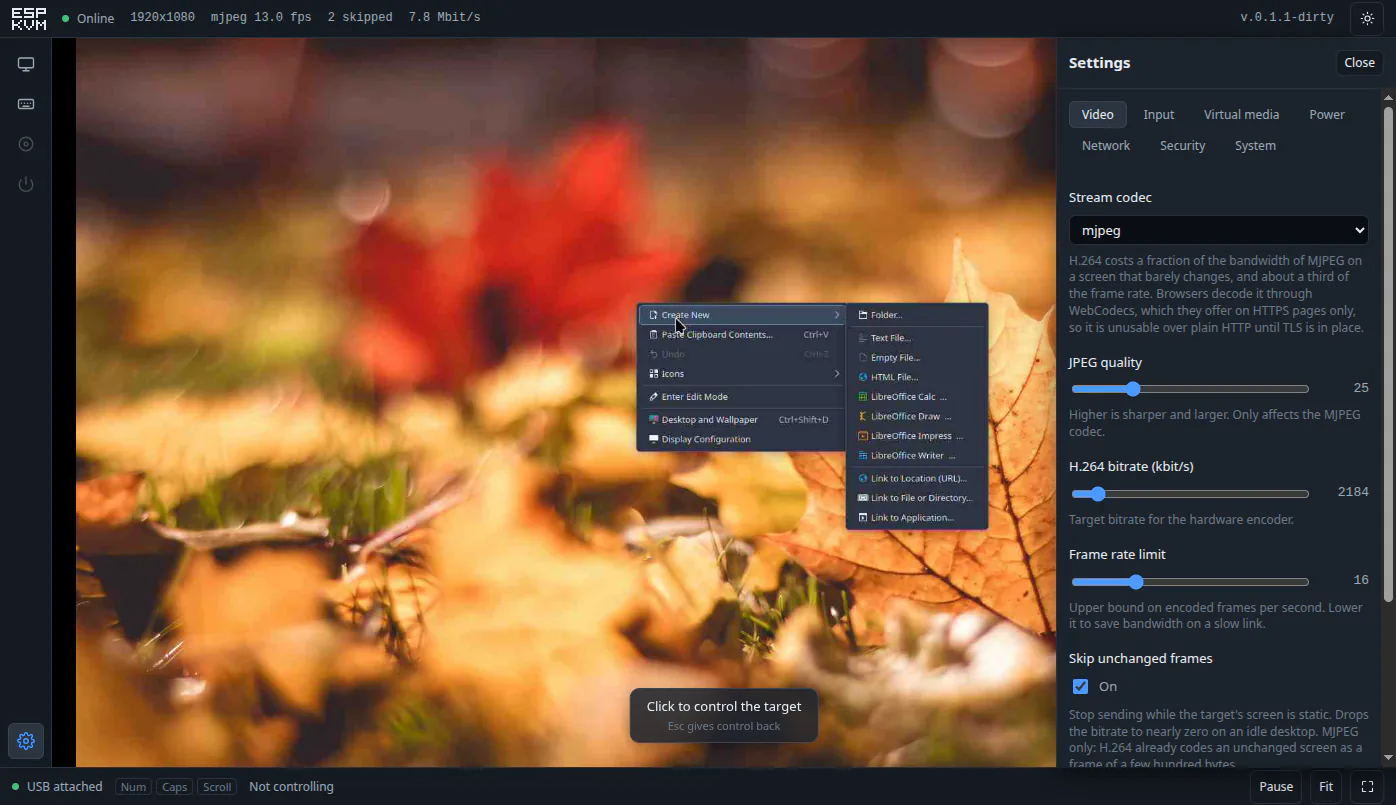
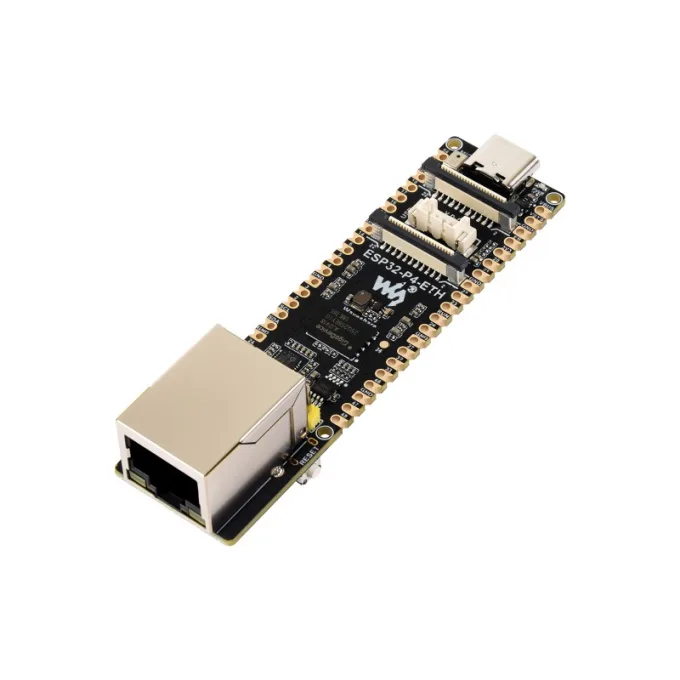
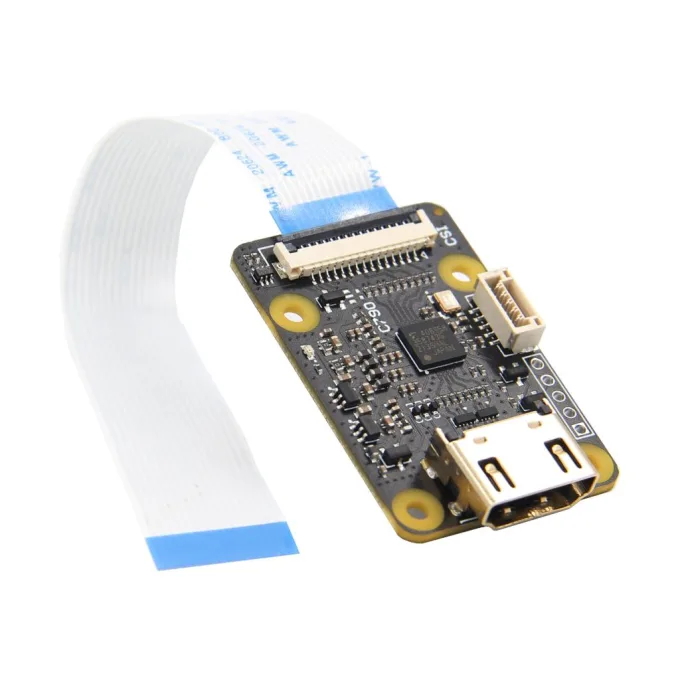
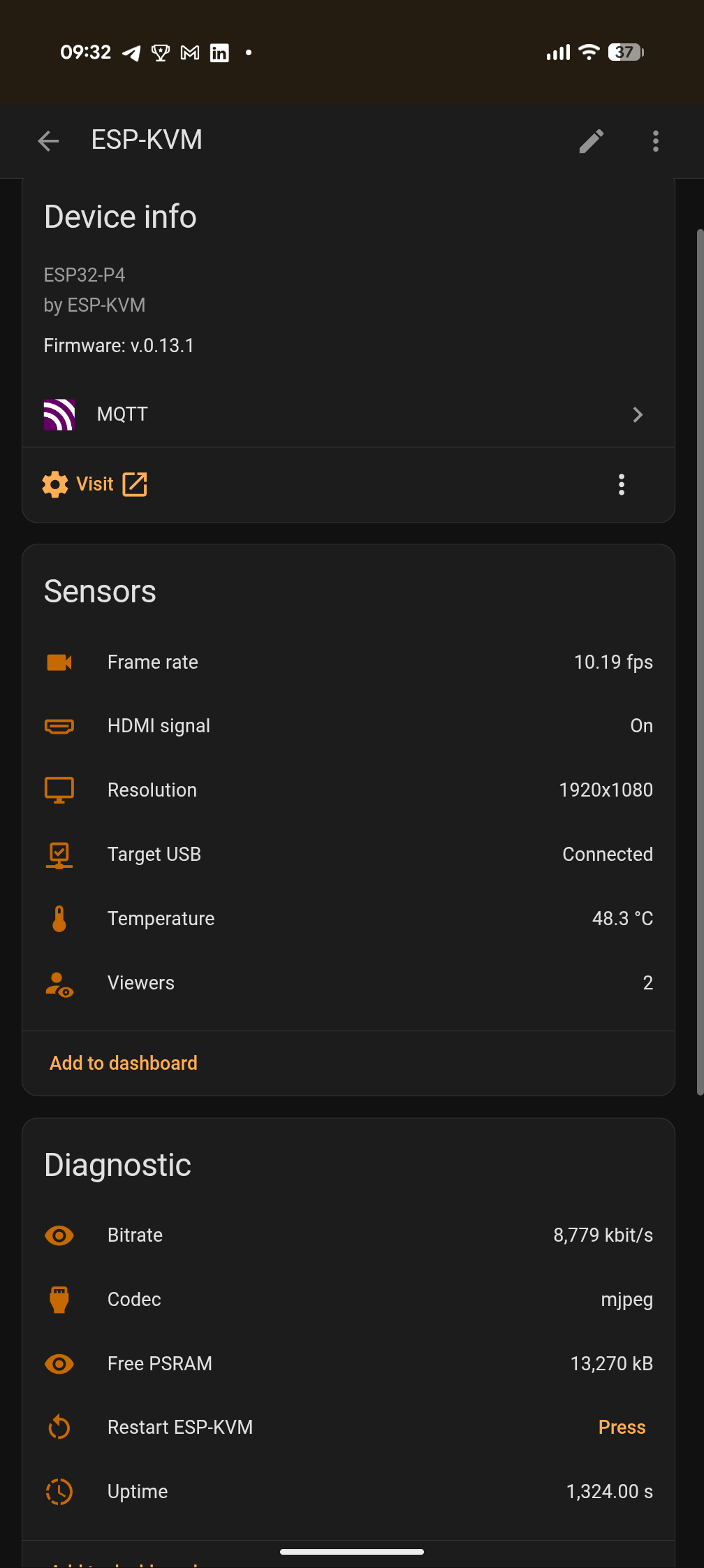
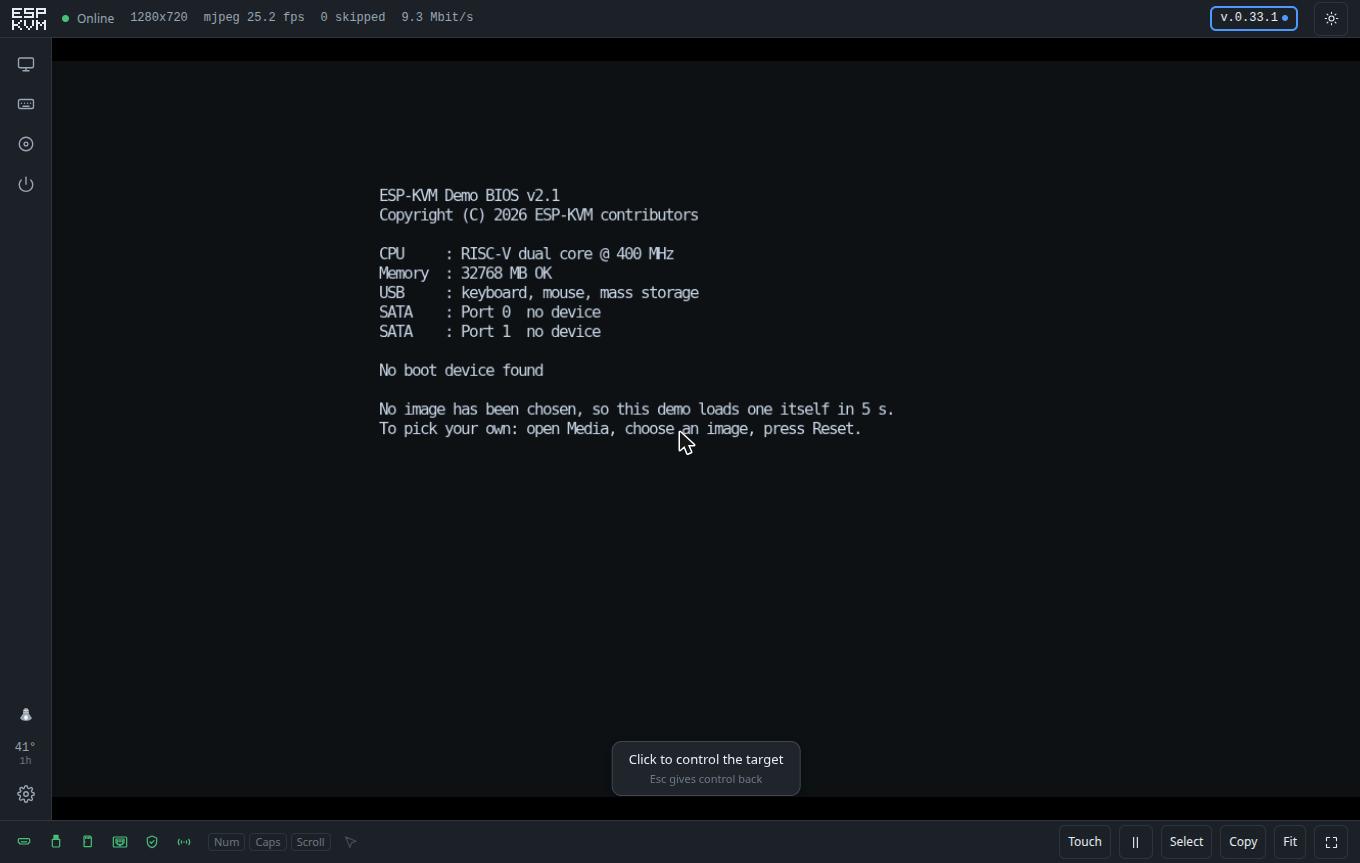
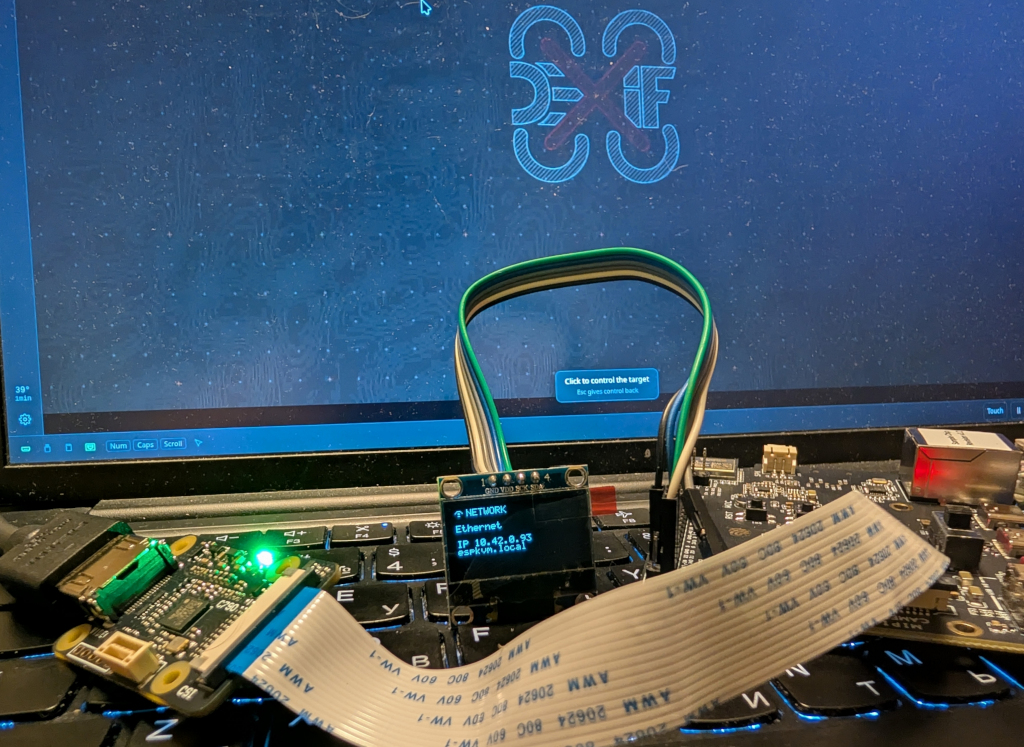
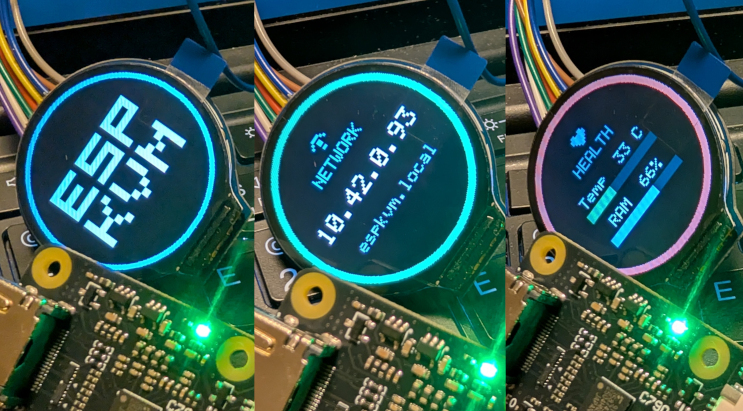
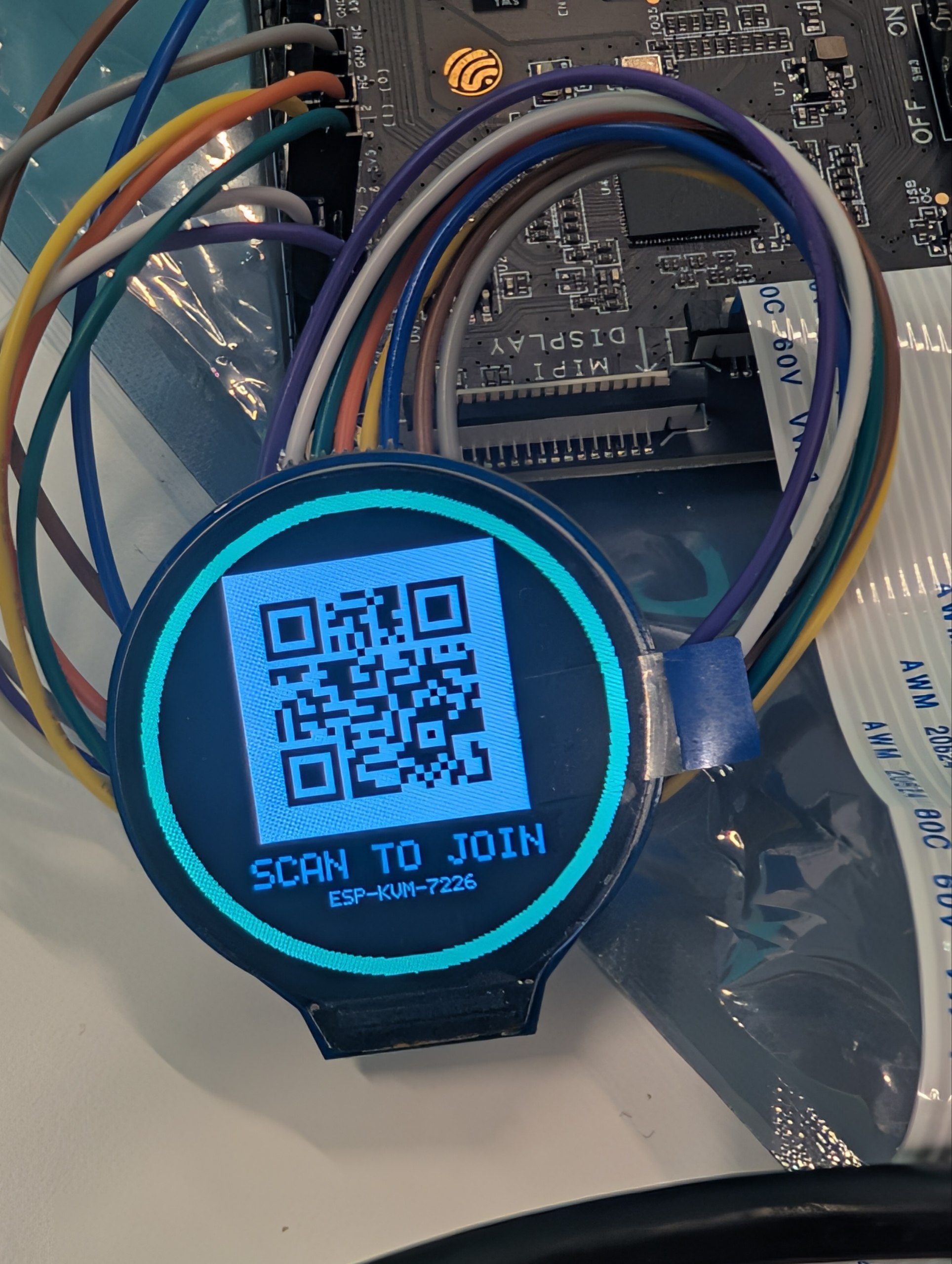
Every picture here is at the resolution I took it at, so they are large on purpose - right-click and save rather than screenshot the page. The console screenshots, the photographs of my own hardware and the drawings on this site are mine and you may use them with a credit to ESP-KVM. Board photographs belong to the companies that make the boards and are used here only to identify the hardware; if you print one, credit them, not me. If you want a picture of something not shown here - a particular board, the wiring, the display - ask and I will take one.
Video
Three short clips, silent and unedited, recorded on the bench while the things in them were being built. They are feature recordings rather than a produced demonstration - there is no such video yet, so please do not call them one.
- Recording the screen — a recording whose picture starts before the record button was pressed, because the device was already holding the last minutes of the screen; then the same recording played back with the keys that were typed shown as subtitles.
- Reading a screen as text — a NixOS boot menu captured over HDMI, with its lines selected by the mouse and copied, the way text on a web page is. This is the part that surprises people.
- The round display in use — the little screen on the device cycling its pages: the name, the address to open, the health. Behind it in the shot is a laptop showing the console itself, with the desktop of another machine inside it - which is the whole idea in one frame.
Both live on the project's channel. Embed them or take stills; if you need a particular moment recorded differently, ask.
Naming
The project is ESP-KVM, with the hyphen and the capitals. The site is espkvm.io and the source is at github.com/espkvm/espkvm. It is not affiliated with Espressif, Waveshare, Geekworm or M5Stack, whose boards it runs on and whose names are theirs.
Asking me things
The fastest route is a GitHub discussion or an issue; both reach me and both stay public, which is usually better for a reader who follows the link. There is also a Telegram channel. I answer questions about how it works, what it cannot do, and what I got wrong - the last one being the most useful thing I can offer a writer.