0.37.0 - the screen as two kilobytes
A text screen is about two kilobytes. The video of that same screen is megabits a second. On a phone tether that decides whether you get anything at all.
Tick "text when the screen is text" in the video readout and the console shows the characters and stops the stream. The keyboard still reaches the target, which is most of what a BIOS asks of you. It is a standing preference, not a place you go: with it on, the view follows the machine. Characters at the boot menu, the picture the moment a desktop paints, characters again at the next restart. Both directions need two readings to agree, so a screen near the edge of being readable does not flicker between them. The readings come along the same socket the picture used and carry only what changed, so walking a boot menu moves the highlight about as fast as the machine repaints it.
The selected row comes through too. A menu says which line you are on by drawing it inverted, and plain text loses exactly that; inverted cells are now reported and drawn inverted.
A screen gone to one flat colour is noticed. Reading characters cannot cover a modern Windows stop screen: that is a graphical page in a proportional font, with no grid to cut. It does have a shape a few hundred samples can see: nearly all one colour, and it stays. The device reports how long the picture has been flat and publishes it to Home Assistant. What that means is yours to decide.
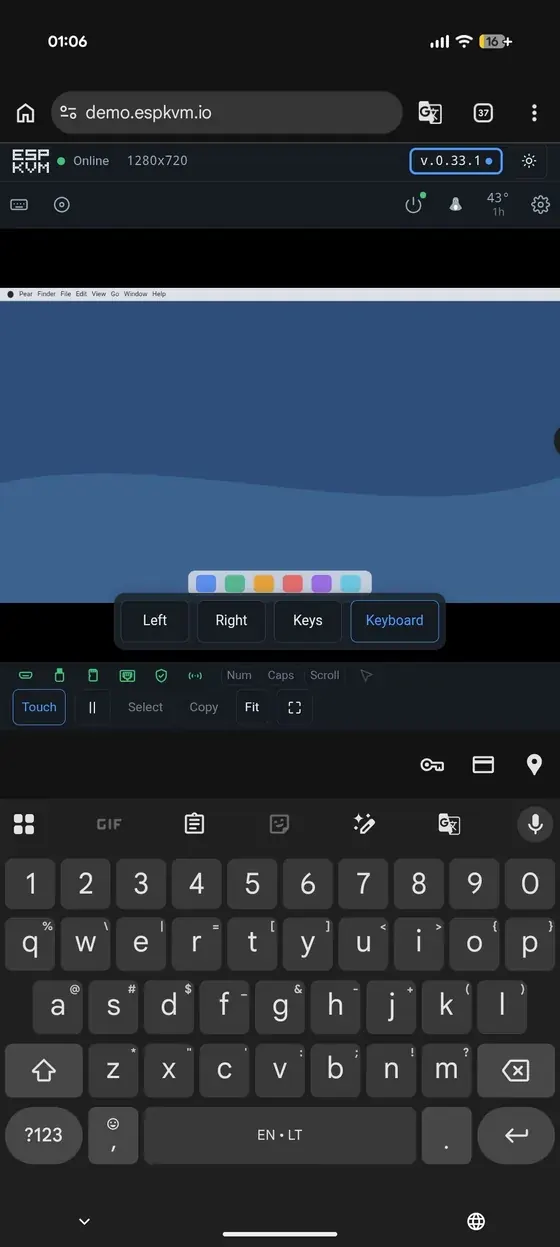
The phone's keyboard stops pushing the picture off the screen. A virtual keyboard covers the window rather than shrinking it, so the console was laid out as if it were not there, and the browser did the only thing left to it: it scrolled the page to reach the field, taking the status bar and the top of the picture with it. The keyboard is measured now and the console is sized to what is left, so the whole screen stays visible above it and nothing scrolls.
A viewing token. Home Assistant's camera integrations take a URL and little else, so putting a target's screen on a dashboard meant turning the login off. A token lives in Settings, Security, and there is none until you make one. It opens the MJPEG stream, a single frame and the capture figures, and it cannot press a key or cut the power. Only its hash is kept, so you see it once.
Go back to any published release. The two slots let you step back one version, which helps only while the one you want is still in the other slot. Settings now lists what the project has published and installs the one you pick. The device fetches the image itself, because the browser is not allowed to, and that means the device talking to GitHub - so it is off until you turn it on. A KVM often sits where nothing is meant to reach the internet, and ordinary updates do not need it.
Underneath all that: security headers on every answer, a stricter idea of who is asking, a hotspot that no longer comes up open by default, and a long list of fixes found by re-reading the new code rather than by running it.