0.52.3 - Fixed: firmware install from Home Assistant, and a more reliable MQTT integration
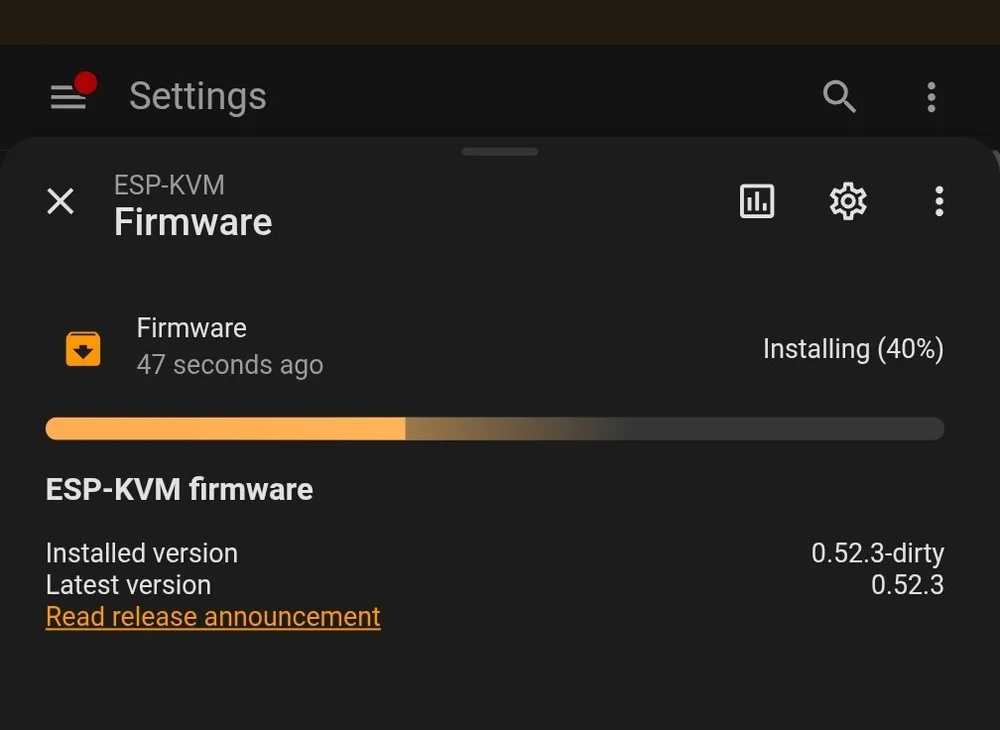
A report on GitHub (#58), and I could see it on my own setup too. Press Install on the ESP-KVM firmware card in Home Assistant and you get this:
Failed to perform the action update/install. 'payload_install'One missing field
Home Assistant finds the device's entities from config messages that the device publishes over MQTT. The one for the update entity said where to send the install command, but not what to send. Buttons have a default payload. An update entity does not, so Home Assistant looked the field up, found nothing and gave up. The field is there now.
The rest of the MQTT side
After that bug I read the whole Home Assistant side again. These were worth fixing:
- The update check blocked every timer in the device. Once in six hours
the device asks the update manifest for the newest version. That is an HTTPS request with a 20-second timeout, and it ran on the firmware's timer task, which has a 3.5 KB stack. While it waited, every other timer waited with it. It runs on its own short-lived task now.
- A long runbook name overflowed a buffer. A runbook button's name goes
into its config message twice. With a long name the message no longer fit in 512 bytes, and the next write went past the end. The buffer is bigger now, and a message that still does not fit is dropped instead of being sent cut off.
- A retained command would repeat forever. Publish
restartwith the
retain flag by mistake, and the broker hands it back on every connect. The device would restart, reconnect and get the command again. Retained commands are ignored now.
- Version numbers. My tags look like
v.0.52.3. Home Assistant's version
parser does not know that shape, so it treated any difference as an update. It gets 0.52.3 now.
Smaller things: the device publishes everything again when Home Assistant restarts, entities for a feature you switched off are removed, screen text is cut to the 255 characters a state can hold, and a temperature below zero keeps its minus sign. And the browser no longer fills the MQTT user and password with your console login.
What you see now
The update card shows a progress bar while the image downloads - the picture at the top is one from my own Home Assistant - and it links to the release notes. There is also a firmware version sensor under Diagnostic. It is there even when the device is not allowed to check for updates.