0.71.0 - A Switch and a Steam Deck on the OS button
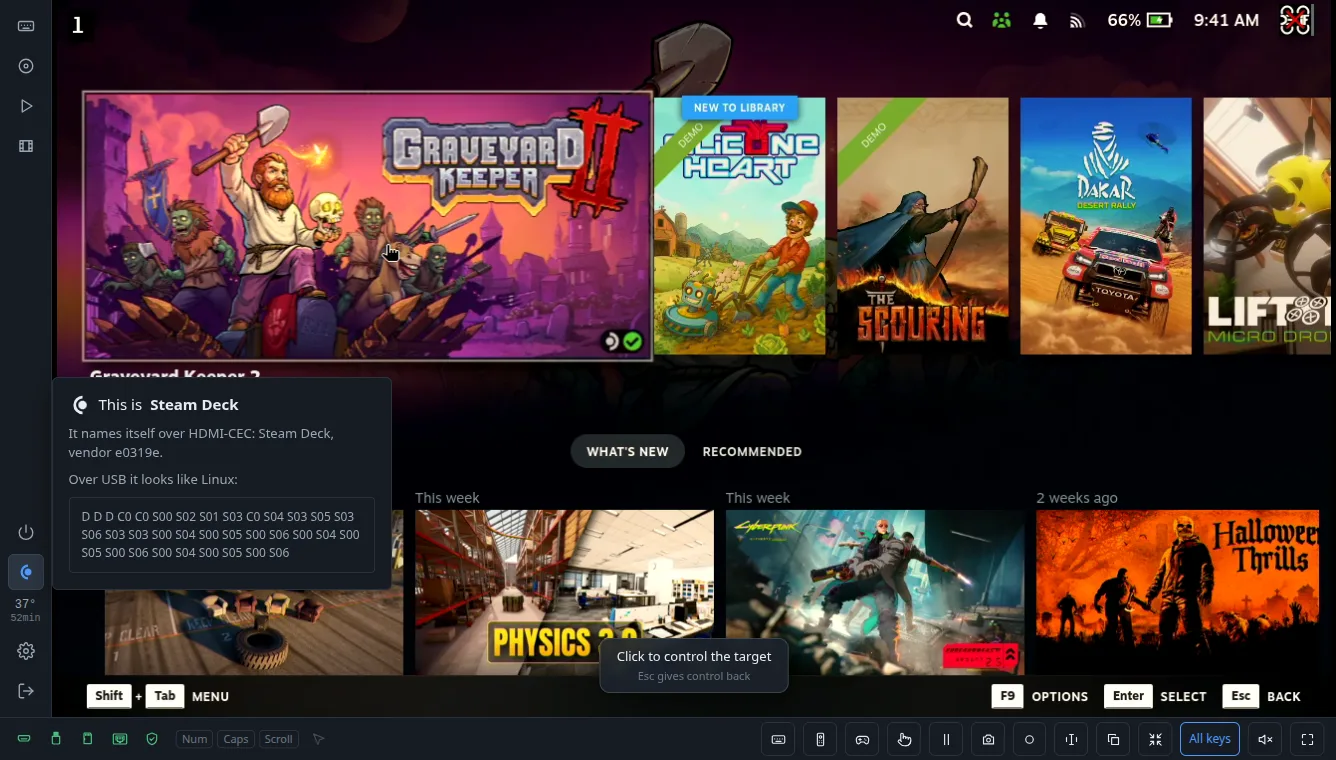
The OS button on the console's rail shows what the target is: Windows, macOS, Linux or Android. The device guesses it from how the target enumerates it over USB. Each system asks for the USB descriptors in its own order.
A Nintendo Switch in its dock asks in an order much like Linux, and a Steam Deck runs Linux. So both showed a penguin.
Over HDMI-CEC both say who they are. The Switch calls itself "NintendoSwitch" with Nintendo's vendor id. The Steam Deck in the official dock calls itself "Steam Deck". The console now goes by that instead of the USB guess. The button gets the device's own icon, and its window shows the name and the vendor id from CEC, with the USB fingerprint under it.
With a USB-C to HDMI adapter instead of the dock, the Steam Deck usually has no CEC line at all. Then it is still Linux.
H.264 restarted every few seconds with a Switch
On rev 3.x chips the device tells the H.264 encoder how many frames a second to expect. The encoder needs it to split the bitrate between frames. The device used to give it the rate it had actually reached, measured every few seconds.
With 720p60 from a Switch that rate jumped around: 52, then 58, then 52 again. Each new number restarted the encoder, and a restart begins with a keyframe, a large frame that makes the picture stutter.
Now the device gives the encoder 60, 30, 20 and so on: the source's rate, or a half, a third of it. It moves to another one only when the reached rate is clearly closer to it. 52 and 58 both stay at 60. A Steam Deck at 720p60 gets 59 frames a second, and the number was set once, when the picture came up.
Comments