Two more boards, and a watchdog for a picture that breaks into blocks
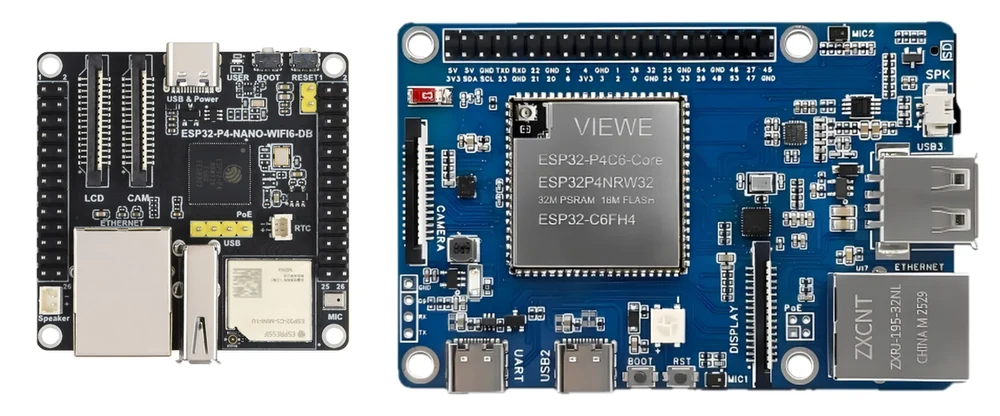
Two more boards have images, and a fault that has been bothering me for weeks got a guard. The guard turned out to be the wrong answer, which is the next post; this one is what shipped.
Waveshare ESP32-P4-NANO-WIFI6-DB
The NANO with a dual-band ESP32-C5 where the C6 used to be, on an external antenna. It is the first supported board that can join a 5 GHz network.
Everything the KVM touches is the family layout: Ethernet on the same pins, microSD on the same six with the power gate on GPIO 45, capture I2C on 7 and 8. The camera connector is the 15-pin Raspberry Pi one, so a C790 ribbon fits with no adapter.
Two things are specific to it. The board carries an ESP32-P4NRW32X, which is rev 3.x silicon, so it gets one image and no pre-3.0 twin. And the co-processor being a C5 changes the esp-hosted profile, though the SDIO pins are the ones every other board here uses.
VIEWE ESP32-P4-Pi
A Raspberry-Pi-shaped carrier for VIEWE's own P4 module: 32 MB PSRAM, 16 MB flash, an ESP32-C6, IP101 Ethernet, microSD, and the 15-pin camera connector again.
VIEWE publish both schematics, the carrier and the module. That is rarer than it should be, and it means this is the first board here where even the WiFi co-processor's SDIO wiring was read rather than inferred from which pins the module does not bring out. Every pin it uses turns out to be a firmware default already.
Three USB ports, and only one of them is the target's. One Type-C is a CH340C for power, flashing and the log. The other Type-C is the OTG-HS that goes to the target, so that lead is C-to-A. The Type-A socket is a full-speed host port the KVM does not use.
Its 40-pin header came out of the schematic identical to the Waveshare PoE board's, pin for pin. That is three boards with one layout now, which is worth knowing before you wire anything to a fourth.
Neither board has been run on hardware. Both were built from vendor schematics, the images build, CI publishes them, and that is the whole claim. If you have one, flash it and tell me what happened.
The picture that breaks into blocks
On a still screen, after a while, the picture would go blocky and stay that way for ten or twenty minutes, then come back on its own with nothing touched.
What I could measure: the same unchanged screen encoded to 6.7 KB keyframes where a minute earlier it had been 148 KB. The stream was using 11 kbit/s of the 4000 it was allowed, so it was not short of bandwidth, and raising the budget to 12 Mbit/s changed neither the bitrate nor the picture. Nothing I could set on a running encoder moved it: not the bitrate, not a longer GOP, not a flood of keyframe requests. Building a new encoder cleared it every time.
So 0.46.0 watches its own keyframes. Three in a row at a fraction of their usual size mean the encoder is stuck, and it gets rebuilt - one lost frame, at most once every two minutes. There is a switch for it in Settings under Video. The coarsest quantiser the encoder may use is capped lower too, which bounds how ugly it can get before the rebuild.
That is a fix for the symptom by someone who could not find the cause. The next post is the cause.
Also in this one
A tab left in the background came back in blocks. Chrome throttles a hidden tab, the decoder falls behind, and the console was dropping delta frames to catch up - which breaks the reference chain, and the device cannot see it happen because it sent those frames. The console stops decoding while the tab is hidden and asks for a keyframe when it comes back, and does the same whenever it has to drop a frame.
Comments