0.58.0 - a TV remote over HDMI
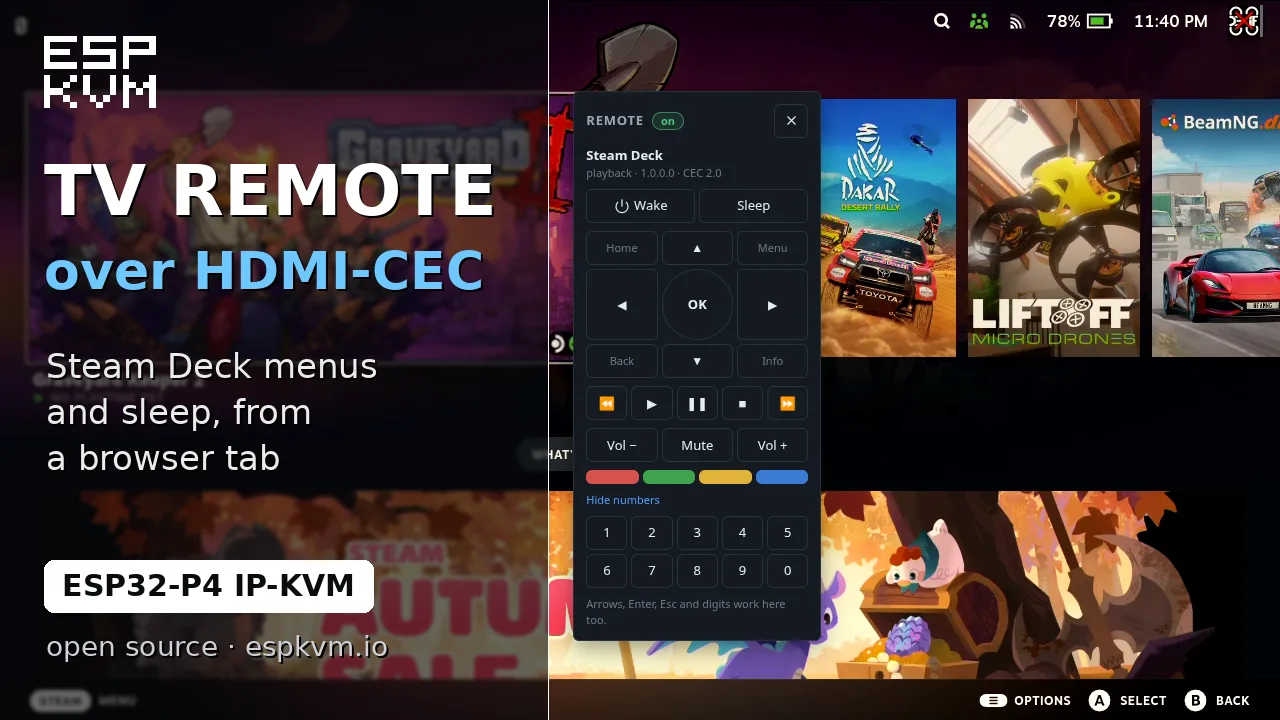
HDMI-CEC
An HDMI cable has one more wire besides the picture: CEC, the line a TV remote uses to drive the box plugged into the TV. The TC358743 capture chip has a CEC controller, and on the C790 board the line is wired through. So the device now sits on the cable as a TV would.
It finds what is on the other end and asks it who it is. Click the HDMI icon at the bottom of the console and you see the name, the kind of device, the CEC version and whether it is on. When a source answers, a remote button appears next to the on-screen keyboard: arrows, OK, Back, Home, play and pause, volume, the four colour keys and digits. The remote is a small window over the picture, so you watch the screen react while you press.
The same is in the API (/api/v1/cec), in runbooks (hdmi standby, hdmi wake, hdmi key up) and in Home Assistant.
I tried it with a Steam Deck in its official dock. The name, the remote keys in the Steam menus and Sleep work. Wake does not: SteamOS does not wake up on a CEC message, only on a controller.
What it is for:
- Your parents' TV box stopped working and they do not know what to do.
They move its HDMI cable from the TV to the KVM, and you fix it from your own browser: an update, a sign-in, a setting.
- The same for a kid's game console at home: the account, a stuck update,
parental settings.
- A media box with no keyboard, Kodi or Plex on a Raspberry Pi: drive it
with a remote from the browser.
While the KVM has the cable, the TV shows nothing. To keep both, put an HDMI splitter in front; the C792 has one built in, though I have not run it yet.
Only TV boxes, consoles, a Raspberry Pi and the like speak CEC. An ordinary PC does not, and then there is simply no remote button. Boards with an LT6911 capture chip have no CEC.
Pointer lock
In relative mode the target moves its own cursor and speeds it up as it likes, so the browser's cursor and the target's never agree. Now, while you are in control, the console hides your cursor and sends only movements. The only cursor left is the one in the picture. Esc gives yours back.
This matters for SteamOS in game mode, where the absolute pointer does not move at all. Switch Settings -> Input -> Pointer mode to relative.
Smaller things
- The buttons under the picture are icons now: touch, fit / stretch / 1:1, select text, copy text.
- In relative mode a click no longer moves the cursor first. Clicks went out as absolute reports.
- A Steam Deck was shown as Android. It is shown as Linux now.