0.51.0 - a dashcam for the machine in the closet
Nobody watches a dashcam. It sits on the glass, records the road onto its own card, throws away what turned out to be nothing, and keeps the half minute before the bang. You only ever look at it afterwards, and that is exactly when it is worth the money.
A remote console is the opposite: it shows you the screen while you are looking at it. The machine that locks up at 04:00 locks up while nobody is. So this release gives the server the dashcam: the screen goes onto the device's own microSD card, the last minutes are held in case they turn out to matter, and what led up to the stop is saved by itself.
Press record and the screen goes to the card. Press the camera and a JPEG lands there. And the recordings panel plays any of it back in the browser.
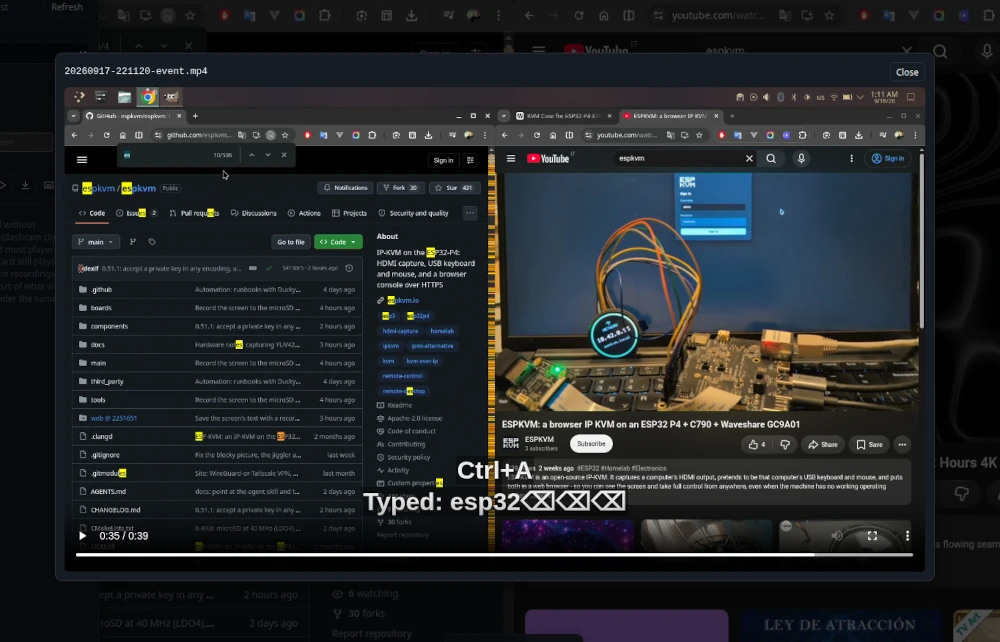
There is a short clip of it: a recording that already holds what happened before the button was pressed, and then the same recording played back with the keys that were typed showing as subtitles.
No sound, and nothing installed on the target. Watch it on YouTube.
Nothing is encoded twice
The device already encodes the screen as H.264 for the viewers. A recording is that same stream, written into VIDEO/ as a .ts file. So the cost of recording is the card, not the encoder: on the Function EV, with a video playing on the target, the picture stayed at 21-22 fps while recording and not one frame was lost.
A .ts opens in VLC and mpv, and one cut short by a pulled card, a full card or a power cut still plays up to where it stopped. Long recordings split into files of ten minutes and stop after an hour, both settings.
What was typed, as subtitles
With keystrokes in recordings switched on, each video gets a .srt beside it: "Typed: root", "Ctrl+Alt+Delete", "Down x5", "Left click (812, 440)". Typed text can be dots instead of characters, which is the default when you turn it on, or written out in full if that is what you need. Put the .srt next to the video and any player shows it; the console's own player shows it over the picture.
The loop, and the bang
This is the part that behaves like the thing on the windscreen. The device keeps the recent past of the screen going round, and writes it out when something happens: the screen stays one colour (a stop screen), a watched phrase appears, the power LED goes off, or you press the button - the same button you press when someone cuts you off and you want the last minute kept.
The clip becomes an MP4 with a chapter for each event, so a player's chapter menu jumps straight to the moment. With notifications on it arrives in Telegram as a video that plays in the chat. A second press while it is being saved adds a chapter and makes the clip longer.
Where the past is kept is a choice. In memory it costs nothing until something happens - minutes of a still screen, tens of seconds of a playing video. On the microSD card the device writes all the time in short pieces and deletes the old ones, which reaches back the full length on any board, including the ones with an older chip that have almost no spare memory.
A timelapse, and a player
A timelapse keeps one frame every few seconds and plays them back at 25 fps: an hour at one frame in ten seconds plays in fourteen. Eight hours of an install becomes a minute you can actually watch.
Play in the recordings panel streams a recording from the card as it plays - nothing is downloaded first. An MP4 goes to the browser's own player; a .ts is split into frames in the console and decoded by the same H.264 decoder the live picture uses, with seeking and the subtitles over the video.
And search
While recording, the device reads the screen as characters every three seconds and saves what it says beside the video. Type a phrase in the panel and it lists where that phrase was on the screen, and plays from that moment. It works on screens a character generator drew - a BIOS, a boot menu, an installer, a console - which is exactly where you look for the line that explains the failure.
Who else does this
I looked at what the other IP-KVMs offer before building it.
| Device | Screenshot | Recording |
|---|---|---|
| PiKVM | a button in the web interface | not in the interface; the docs say to use websocat and ffmpeg from a terminal |
| TinyPilot | in the Actions menu | no; they suggest recording your own screen |
| JetKVM | no | no; the request has been open since November 2025 |
| Sipeed NanoKVM | no | no |
| GL.iNet Comet | no | over SSH, ustreamer-dump piped to ffmpeg |
| ESP-KVM 0.51.0 | a button, to the card and over the API | a button, to the card, plus a dashcam, a timelapse and playback in the console |
Automatic recording of what led up to a crash does exist - in server controllers. Dell iDRAC keeps the last boots and a video of the last failure, HPE iLO has Console Replay, Lenovo XClarity keeps boots and failures. All three want an Enterprise licence, and they live on server-class hardware. ATEN sells session recording as a separate server product.
So: a dashcam for a server, on a $40 board, with the footage on a card in the device rather than on someone's laptop.
Also in this release
- The screenshot works on the H.264 codec too - the JPEG engine is idle while H.264 runs, so the device uses it.
- Recording can be started from a runbook (
record 300,timelapse 60,screenshot) and from Home Assistant, which also gets a timelapse button. - The clock can be set over NTP, and the time zone is now a list of cities in Settings - it used to be a setting the console never showed.
- Downloads answer HTTP ranges, which is what lets the player seek.
And the fixes worth naming: the device could panic when a viewer left mid-frame (two tasks wrote to one TLS connection); a second viewer got 2 fps because the first took its wake-up; MQTT stopped publishing for good after one over-long message; screenshots failed on the P4-ETH while H.264 ran; and on that board a keyframe came once every nine seconds instead of every two.