0.61.0 - a button on the box, and a console you can trim
A button on the box
The device can have a button of its own now, for whoever stands next to it. Any push button on a free pin works, or the M5Stack Unit Button on a Grove port. Settings -> Power -> Button on the box gives a short press one action and a 1.5 s hold another:
- the target's power button, or a hard power off;
- reset;
- Wake-on-LAN;
- a runbook, by name;
- save the dashcam's last seconds as a clip;
- a screenshot to the card.
They are the same actions a schedule runs, and a schedule can now save a clip or take a screenshot too. Not tried with a real button yet.
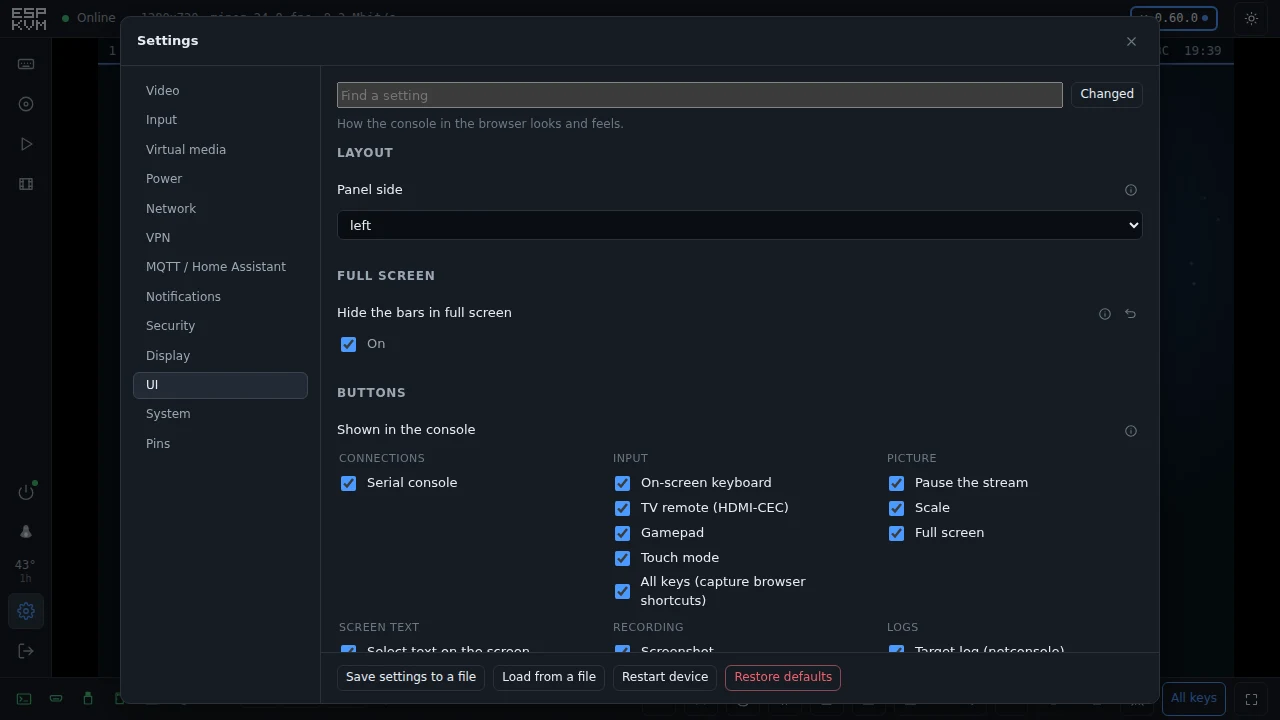
A UI tab in Settings
Settings has a tab for the console itself. "Shown in the console" is a tick per button: the gamepad, the TV remote, recording, screen text, the serial console and the rest. Untick the ones you never use and they leave the bar. It only hides the button; the feature stays as its own settings have it.
The same tab has the vibration on a phone. The on-screen keyboard, the arrow keys and the gamepad give a short tick under the finger, and the touchpad ticks every couple of millimetres the finger travels, the way the Steam Controller's pads do. A browser can only make a tick longer, not stronger, so "Strength" picks 12, 25 or 45 ms. Android only; Safari on an iPhone cannot vibrate.
Full screen is all picture
In full screen the status strip, the side rail and the bottom bar slide away. They come back over the picture, so the video does not jump:
- the mouse at an edge of the screen - after a short pause while you have control, so the target's own taskbar stays usable;
- the small tab at the top, for a finger;
- a tap of the right Ctrl key on its own, the "host key" of virtual machines.
They go again a few seconds after you leave them.
More M5Stack
All the M5Stack parts now have a page of their own. New this time:
- Unit OLED (U119), a 1.3" 128x64 panel. Its SH1107 sees the glass on its side, so the firmware turns the picture as it sends it. Run on the Unit PoE-P4.
- Unit RTC is found by itself now. Its chip is a clone of the PCF8563 that reads one bit differently, and a new one holds no valid time; either was enough for "Auto" to pass it over. "Auto" also looks on the display's bus, where the clock sits on the Unit PoE-P4. Run on the board.
- Unit Glass2, the transparent 1.51" OLED, and Unit Relay for the power button. Not tried yet.
M5Stack published the schematic of the Add-on Display In, and it had two spare lines worth using. The LT6911D pulses G38 on every resolution change, so the picture now follows a mode change at once. G37 is the microSD socket's card-detect switch, so a card going in or out is noticed at once too. That one reads high with a card in, the opposite of most, and my first try read every card as gone.
The same schematic answered another question: there is no HDMI audio on this add-on. Every audio pin of the LT6911D is left unconnected. I measured it first, with a new pin probe that counts how fast each pin switches: with a laptop playing a video into the HDMI input, every line the add-on has stayed still.
Smaller things
- Settings opened on an empty pane until a tab was clicked. It now opens on the first tab.
- In Chrome on a Pixel, full screen pushed the bottom bar off the screen; it stays on now.
GET /api/v1/video/statushasframesandframeAgeMs: "signal" says the HDMI is locked, these say pictures are really arriving.- In the demo, the touchpad on a phone moves the pointer.