0.70.0 - Half the delay, a start in 3 seconds
In 0.69 the encoder got faster, and the delay from mouse to picture went from 150 to 118 ms. I wanted to know where the other 118 ms go.
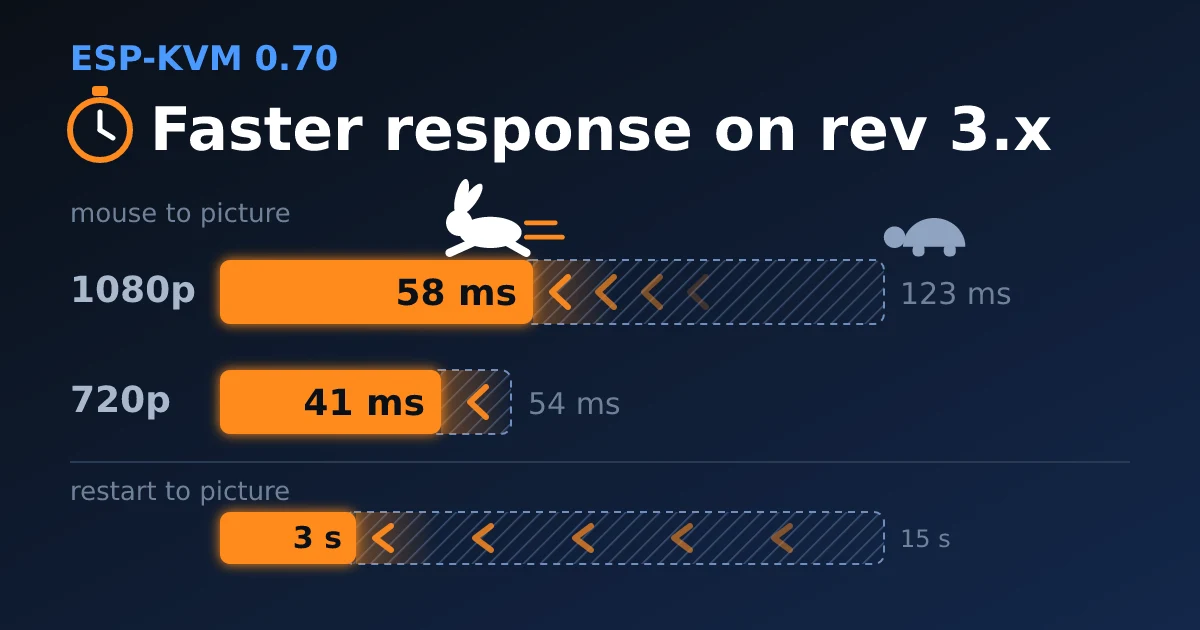
The result on a Function EV (rev 3.x chip):
| 0.69 | 0.70 | |
|---|---|---|
| Mouse to picture, 1080p | 123 ms | 58 ms |
| Mouse to picture, 720p | 54 ms | 41 ms |
| Restart to picture | 14.6 s | 3 s |
At 1080p that took two steps: encoding a frame while it arrives, then 50 Hz from the target.
Where the time goes
A Function EV at 1080p30, H.264 over WebRTC, on the same network:
| Step | ms |
|---|---|
| Browser to device, device to USB | about 5 |
| The target draws the pointer and sends the frame, the frame arrives whole | about 50 |
| The frame waits for the encoder | 20 |
| Encoding | 36 |
| Sending | 2 |
| Decoding and showing in the browser | about 10 |
The encoder is a third of it. Most of the rest is waiting for whole frames: the target sends one every 33 ms, and the device started encoding only after the last line of a frame had arrived.
Encoding a frame while it arrives
The encoder reads a frame top down, 16 lines at a time. At 1080p it is slower than the capture, 36 ms a frame against 33. So it can start on a frame that is still coming in, two rows behind the newest line, and never catch up.
At 720p60 the encoder is almost as fast as the capture (16 ms each), so there it starts later, with room for an encode 25 % faster than usual.
If the encoder read lines that have not arrived yet, the frame would tear. So before it starts, the device checks how far the DMA has written.
To test it I put a page on the target that draws its frame number in eight rows, and read them back from the H.264. At 1080p50, 1080p30 and 720p60 no frame had two different numbers.
| H.264, Function EV, mouse to picture | before | after this step |
|---|---|---|
| 1080p30 | 123 ms | 86 ms |
| 720p60 | 54 ms | 41 ms |
The frame rate stays the same. I measured with a script that moves the pointer and times the first H.264 frame that shows it. Browser decoding is not in these numbers.
50 Hz from the target
At 50 Hz the target sends a frame every 20 ms instead of 33, so the pointer gets into a frame sooner. Two CSI lanes cannot carry 1080p50 in 24 bits a pixel, but rev 3.x chips capture in 16 bits, and then a 1080p50 line just fits: it comes in every 17.8 us and takes 15.8 us to send.
The encoder takes only every other frame at 50 Hz: 36 ms against 20 ms frames. Writing all 50 into memory still slowed it from 36 to 40 ms, because it mostly waits on memory. So the device keeps the frames in between out of memory. The CSI bridge stays closed while the encoder works and opens when it finishes, so the next frame comes in from its first line.
| 1080p50, Function EV | without the gate | with it |
|---|---|---|
| Mouse to picture | 82 ms | 58 ms |
| Encoding a frame | 40 ms | 36 ms |
| Frames a second | 24 | 25 |
1080p50 is now the default EDID profile on boards with a rev 3.x chip and a TC358743. It gives 25 frames a second instead of 27. "full" with 1080p30 is still in Settings -> Video -> EDID profile.
The mouse side
Chrome hands the page a mouse move once per screen refresh, up to 16 ms after the mouse moved. There is another event, pointerrawupdate, that comes as the mouse reports. The console uses it now and sends a move at most every 8 ms. "Measure the delay" moves the pointer itself, so its number does not include this gain.
On high-speed USB the target already polled the device every 1 ms. On full speed it was 4 ms, now it is 1 ms too.
Moves over WebRTC
The picture has come over WebRTC since 0.66, but the mouse still went over the WebSocket. On a lossy link TCP holds every move behind a lost packet until it is sent again. A WebRTC data channel can be unordered and never resend, so a lost packet costs one move.
A data channel is SCTP inside the DTLS that WebRTC already runs. I wrote the receiving half of SCTP for the device, a few hundred lines: the association setup, acknowledgements, and skipping over what the browser gave up on.
Only plain moves go this way. Clicks, the wheel and keys stay on the WebSocket, so a late move can shift the pointer but never press or release a button.
On my network nothing changes with it. It is for phones and Wi-Fi.
The keyboard button on a phone
In touch mode the keyboard button opened the phone's keyboard, which has no Ctrl, Alt, F keys or arrows. A BIOS or a terminal needs exactly those. Now the button opens the console's own keyboard. For typing text with the phone's layouts and suggestions, set Settings -> UI -> Keyboard button to "phone".
The touch buttons show icons now instead of words.
A start in 3 seconds
From a restart to a picture took 14.6 seconds. Three things held it up:
| A test of all 32 MB of PSRAM, every start, that could only log a fault | 0.8 s |
| A window for the button that clears a forgotten password | 8 s |
| Ethernet waiting for the PHY to agree on a speed, before anything else could start | 2.7 s |
The memory test is off. Ethernet starts on its own task while the rest comes up.
The button window shares a pin with Ethernet, so everything waited for it. It is only needed after the reset button or a power-on, so a restart the firmware makes itself (an update, a setting, a crash) skips it now. After a power-on it is 4 seconds instead of 8.
After a restart the picture is ready at 3 seconds.
Encoding as the frame arrives and 50 Hz are for rev 3.x chips with H.264. MJPEG and the older chips encode as before. The mouse, the data channel, the keyboard button and the faster start are for every board.
Comments