Four releases at once - crash dumps, a hotspot, four more boards
Four releases went out in a week and I wrote up none of them. Here they are together.
0.42.2 - a key press wakes the target
Any input now sends a USB wakeup first: a key, a click, a mouse move. A target that did not arm remote wakeup ignores it. One that cut power to its USB port never sees it, so that case is still Wake-on-LAN or the ATX button. The jiggler wakes nothing.
Home Assistant gets the target's port power as its own sensor, so a sleeping machine stops reading as a fault.
0.43.0 - a panic leaves a file
A crash used to leave nothing. The backtrace went out of a serial port you probably have no cable on.
The chip writes registers and task stacks to flash now, and Diagnostics hands you the file: GET /api/v1/system/coredump, DELETE to throw it away. The partition fits in the 56 KB free below the first app slot, so nothing else moves - one cable flash of the table and you keep both slots, your storage and your rescue image. A device updated over the network keeps its old table and never gets a dump.
Releases also carry a stripped ELF per board, 3 MB instead of 18, so a dump decodes to function names against the release it came from. I have two crashes open with no evidence at all; this is what they needed.
Two more in that release. The PoE board's console was pointed at a port that board does not bring out, so it looked dead at boot. And H.264 was held at QP 25 whatever the bitrate allowed, which showed as blocks on a still screen; it goes to 18 now.
0.44.0 - a device you cannot reach
A new board with no password and no network cable had no way in. No address to try, and no hotspot either, because the WiFi co-processor only starts once you pick a WiFi mode - in the console you cannot open.
It waits twenty seconds for a cable now, then opens ESP-KVM-xxxx with no password. Console at 192.168.4.1. Open on purpose: the password it would generate goes to a serial console and a display, and the PoE board has neither. Until you set a password that session reaches the login endpoints and nothing else, and the hotspot stops when you set one. Reported by the first person to run a PoE board.
0.43.0 and 0.45.0 - four more boards
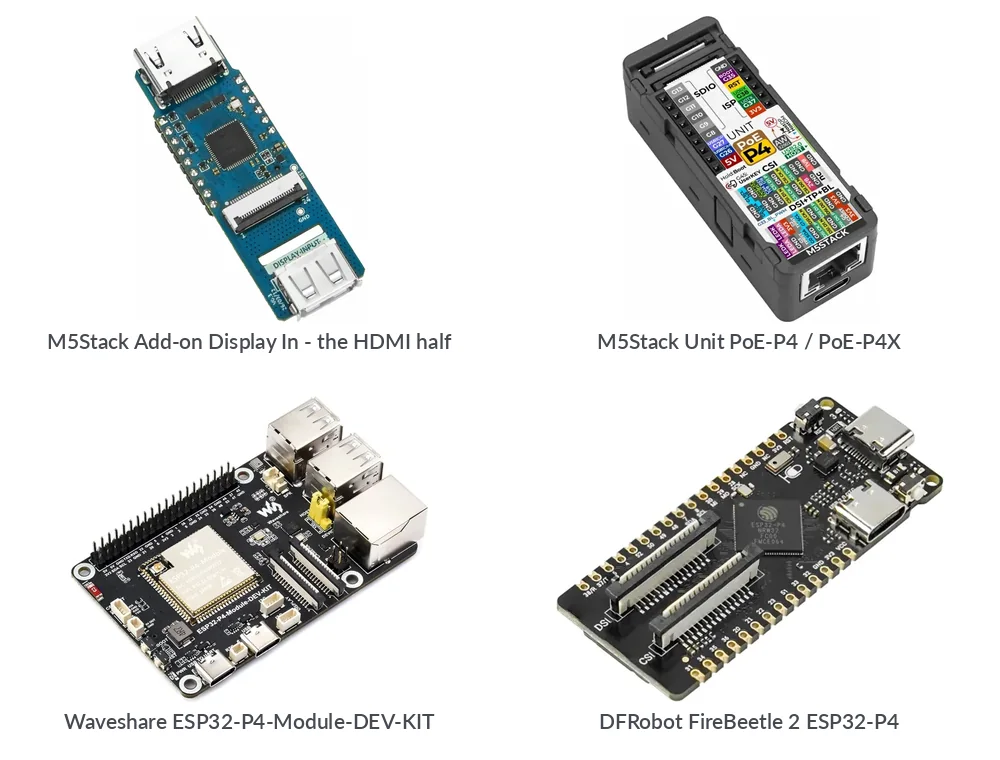
M5Stack Unit PoE-P4 and its rev 3.x twin the PoE-P4X. Network, console and updates work; there is no picture. HDMI on these comes from M5Stack's Add-on Display In, which carries a Lontium LT6911D instead of the TC358743 the C790 uses. That add-on is in the post to me. Until it arrives, gets tested and has a driver, these images give you no video.
Waveshare ESP32-P4-Module-DEV-KIT. The WIFI6-DEV-KIT on a module. Every pin the KVM uses was already in use, and its 40-pin header came out of the schematic identical to the PoE board's. Its USB goes through a switch: a jumper sends the port either to one Type-A socket, which is what the KVM needs, or into an internal hub.
DFRobot FireBeetle 2 ESP32-P4. 60 by 25 mm, 32 MB PSRAM, 16 MB flash, an ESP32-C6 for WiFi, and the 15-pin Raspberry Pi camera connector, so a C790 ribbon fits without an adapter. No wired port, so it comes up on its own hotspot.
The last two have not been on hardware. Both were built from the vendor schematic, and the FireBeetle's pins were checked a second time against Espressif's board file for it. If you have one, flash it and tell me what happened.
The boards that do not work
0.45.0 also carries a list of about a dozen ESP32-P4 boards I read through, in the porting guide, including the rejects. Most fail on USB, not on memory. One has a USB hub soldered onto the port the keyboard would use, so it can only be a host. One does not bring D+/D- out anywhere. Two have no network of any kind.
There is a note on camera connectors there too: 15-pin at 1.0 mm takes the C790 ribbon as it comes, 22-pin at 0.5 mm needs an adapter, and either way 3.3 V has to be on the connector.
If your board is not on that list, open an issue with a link to its schematic.
Comments